Available on
Browsing pre-built templates is free for everyone. Building forms, attaching to jobs, and capturing signatures takes Crew or Shop. See pricing.
Any form your crew needs. Built once. Filled from a phone.
Drag-and-drop builder. Workers complete forms on a phone, attach photos, capture signatures. PDF copy goes to the job and the client record. No clipboards.
What this solves
You need a form for the move-in inspection. A different form for the post-treatment pest report. A different form for the HVAC startup checklist. Today they live as paper in a binder, as a PDF you email the client to print and sign, as a Google Form that does not link to anything. None of them attach to the job they belong to, none of them carry photos, and none of them get signed cleanly.
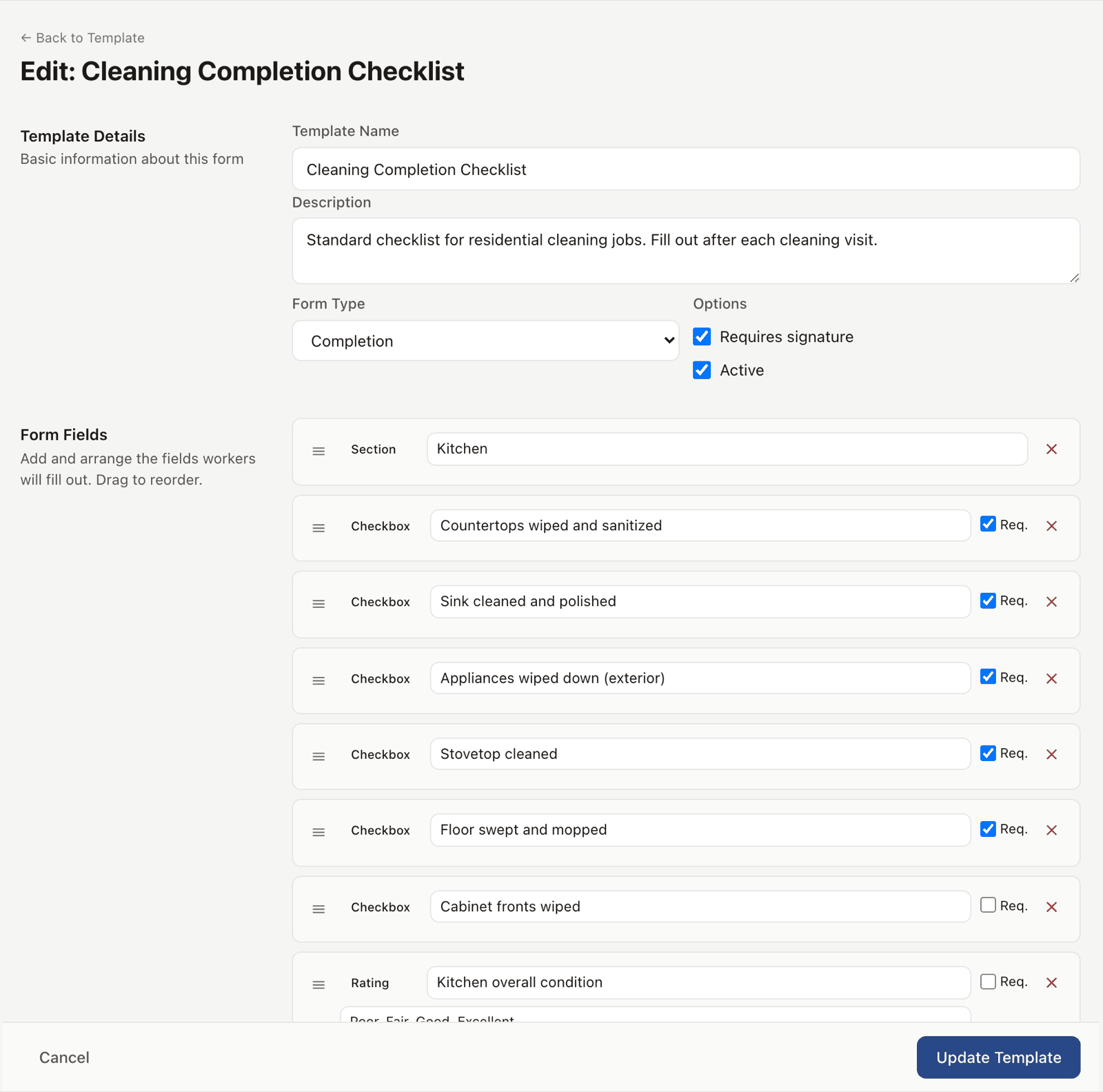
Field Forms is the system for any structured checklist, inspection, or sign-off the work requires. You build the form once with a drag-and-drop editor: text fields, checkboxes, photo capture, signature, conditional questions. Your crew opens the form on the right job, fills it out on a phone, attaches photos, captures the client signature, and submits. A PDF copy is generated automatically and attached to the job.
The form lives where the work lives. No paper. No separate doc to track down later.
How it works
-
Build the form.
Settings, then Field Forms, then New template. Drag in the field types you need: text, multi-line, multiple choice, checkbox, photo, signature, date. Add conditional logic. Save.
-
Attach the form to a job type.
Pick which job templates auto-attach this form. From then on, every job of that type ships with the form ready to fill.
-
The crew fills it out on a phone.
Worker opens the job, opens the form, types or taps through. Photo fields use the phone camera. Signature fields capture a finger sign-off from the client.
-
The submission lands on the job.
PDF generated, attached to the job and the client record. Searchable. Reviewable. You can edit fields after submission if you have permission.
See it live
Browse the form templates in the demo, fill one out, see the PDF that comes back.
Open the live demoNo signup. Click around.
What's included
- Drag-and-drop form builder
- Field types: text, multi-line, multiple choice, checkbox, photo, signature, date, number
- Conditional logic so questions appear based on earlier answers
- Mobile-first fill view in any browser; offline capture and sync ship with the native app on iOS and Android
- Photo capture from the phone camera with automatic compression
- Client signature capture from any device
- Auto-attach forms to job templates
- PDF generation on submission
- Edit history so changes after submission are tracked
- Pull from the template library for pre-built starting points
Plan availability
Field Forms is included on Crew ($79/mo) and Shop ($149/mo). The public template library at /templates is free for everyone, with PDF downloads available without an account. See pricing.
Common questions
Does this work offline?
The web version works in any browser but needs a connection. Offline fill-and-sync ships with the native mobile app, available on the App Store and Google Play.
Can clients fill out forms too, not just my crew?
Yes. Forms can be sent to clients through the portal or as a public link. They fill it out on their phone, sign, submit. The submission lands on the right job or client record.
How many forms can I build?
No limit on the number of templates you can build. Crew and Shop have unbounded submissions; Free and Solo do not include Field Forms.
Can I require a field?
Yes. Mark a field required and the form cannot submit until it is filled in.
Can I edit a form after the client signs it?
Edits after signature are tracked in the audit log. The original signed PDF is preserved. The updated version generates a new PDF with both visible side-by-side.